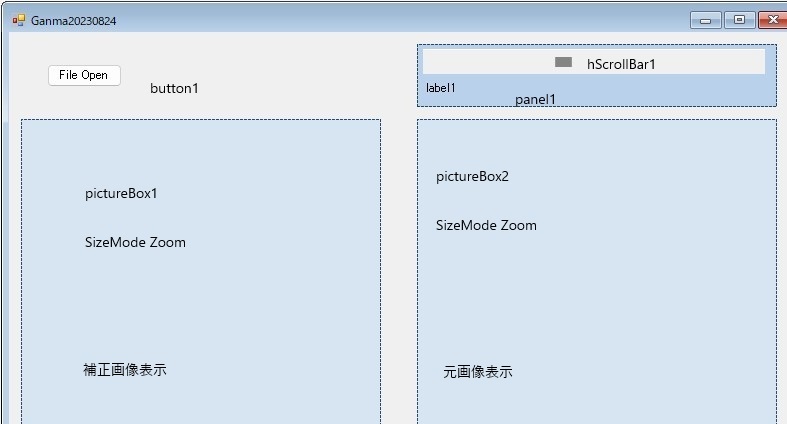
|
using System;
using System.Collections.Generic;
using System.ComponentModel;
using System.Data;
using System.Drawing;
using System.Linq;
using System.Reflection.Emit;
using System.Text;
using System.Threading.Tasks;
using System.Windows.Forms;
namespace ganma
{
public partial class Form1 : Form
{
float V;
public Form1()
{
InitializeComponent();
}
public static Image CreateGammaAdjustedImage(Image img, float gammaValue)
{
//補正された画像の描画先となるImageオブジェクトを作成
Bitmap newImg = new Bitmap(img.Width, img.Height);
//newImgのGraphicsオブジェクトを取得
Graphics g = Graphics.FromImage(newImg);
//ImageAttributesオブジェクトの作成
System.Drawing.Imaging.ImageAttributes ia =
new System.Drawing.Imaging.ImageAttributes();
//ガンマ値を設定する
ia.SetGamma(1 / gammaValue);
//ImageAttributesを使用して描画
g.DrawImage(img,
new Rectangle(0, 0, img.Width, img.Height),
0, 0, img.Width, img.Height, GraphicsUnit.Pixel, ia);
//リソースを解放する
g.Dispose();
return newImg;
}
private void button1_Click(object sender, EventArgs e) //Open File
{
String Fname;
if (openFileDialog1.ShowDialog() == DialogResult.OK)
{
Fname = openFileDialog1.FileName;
pictureBox2.Image = new Bitmap(Fname);
pictureBox1.Image = new Bitmap(Fname);
hScrollBar1.Enabled= true;
}
}
private void hScrollBar1_ValueChanged(object sender, EventArgs e)
{
Image img = pictureBox2.Image;
V = (float)hScrollBar1.Value / 100f + 1f;
label1.Text = V.ToString();
//ガンマ値補正した画像を作成する
Image newImg = CreateGammaAdjustedImage(img, V);
//PictureBox1に表示
if (pictureBox1.Image != null)
{
pictureBox1.Image.Dispose();
}
pictureBox1.Image = newImg;
}
}
}
|
左記は、ソースで、 hScrollBar1_ValueChangedで修正画像を表示
Image CreateGammaAdjustedImageのソースは他サイトのコードを流用しました。
ガンマ値は適当に、( V = (float)hScrollBar1.Value / 100f + 1f;)として設定してあります。
if (pictureBox1.Image != null)
{
pictureBox1.Image.Dispose();
}
上記のように pictureBox1.Image.Dispose()を行わないと、メモリ- オーバのエラ-出るようです
|